


What-if analysis in supply chain planning means changing one or more inputs of a plan, such as demand, supplier lead times, capacity or costs, solving the plan again, and comparing the result with the current base plan before anyone acts on it. It answers questions like “what happens to service and cost if this promotion starts a week early?” or “what if line 2 is down for five days?” For operational and tactical planning, a scenario has to run on the same data and constraints as the live plan and return in minutes.
How What-If Analysis in Supply Chain Planning Works
A what-if analysis has five parts:
- A base plan: the approved current plan, which every scenario is measured against.
- A scenario: the base plan with one or more inputs changed, such as a demand uplift, a supplier delay or an extra shift.
- A new solve: the planning engine optimizes the scenario again with the same constraints and objectives as the base plan.
- A comparison: KPIs side by side, together with the input changes that produced them.
- A decision: authorize one scenario into the live plan, or discard it.
The new solve is the difference from spreadsheet sensitivity analysis. Changing a forecast cell in a spreadsheet shows a new number. Solving the plan again shows what the change does to production, inventory, transport and service once capacity, lead times, pack sizes and shelf life are respected.
Operational and tactical what-if analysis is also different from strategic network scenarios. Network design changes the footprint itself (where DCs and plants sit) over a horizon of years; we cover that in strategic network design and scenario planning. This post is about the weeks and months ahead, where the network is fixed and the question is how to run it.
Types of What-If Scenarios: Demand, Supply, Capacity, Cost and Network
| Scenario type | Typical question | What changes in the model | Outputs to compare |
|---|---|---|---|
| Demand | A promotion moves forward, a price changes, a large customer orders above forecast | Forecast by product, location and week | Service, inventory, lost sales, revenue |
| Supply | A supplier ships two weeks late or short, an alternative supplier is qualified | Lead times, available quantities, sourcing rules | Stock-outs, expediting cost, days of cover |
| Capacity | An extra shift, overtime, a line stoppage, a co-manufacturer, a warehouse or fleet limit | Capacity calendars and rates | Production plan, backorders, cost per unit |
| Cost | Freight rates, fuel, tariffs or energy prices change | Cost parameters | Total cost to serve, margin, choice of source or lane |
| Network | A DC is closed for a week, flows are rerouted, a store is supplied from another DC | Lanes and DC-to-customer assignments | Transport cost, delivery lead time, service |
A single disruption can touch several rows at once. A port closure delays supply and raises freight cost in the same week, so the tool has to combine changes in one scenario. Scenarios can also be built on top of other scenarios (“the promotion case, plus the supplier delay”), so the lineage from one scenario to the next should be visible.
How Fast Does What-If Analysis Need to Run?
Operational questions come with a deadline: the order cut-off, the weekly S&OP meeting, the start of truck loading. If a scenario has to wait for an overnight batch run, the decision may already be made by the time the answer arrives, and planners go back to estimating in spreadsheets.
A practical test is whether a planner can build, run, compare and discard several scenarios within one working session or one meeting. That means:
- Demand scenarios in seconds, because they recalculate projected inventory and service without a full constrained re-solve.
- A constrained new solve of a production, replenishment or transport plan in minutes.
- Larger network-wide optimizations, which can take longer and are prepared before the S&OP meeting rather than run during it.
A scenario must also start from current data, including today’s inventory, open orders and confirmed capacity. A scenario built on last week’s snapshot answers a different question. Storage matters too: a tool that stores only the changed inputs, rather than copying the full planning database for each scenario, can keep dozens of scenarios without slowing down.
How Do You Compare What-If Scenarios on Cost and Service?
A comparison is only fair when every scenario starts from the same base plan and uses the same KPI definitions. Beyond that, a good comparison view shows:
- Cost and service together: production, transport, holding and expediting cost next to fill rate, on-time delivery and stock-outs, plus waste for perishable items.
- Inventory value and days of cover, so a service gain bought with extra stock is visible.
- The input differences next to the result differences, so reviewers can see what was changed.
- More than two scenarios side by side.
- Where the difference occurs: which products, sites and weeks.
Take a supplier that announces a two-week delay on an imported item. Scenario A waits and accepts stock-outs in some stores. Scenario B air-freights part of the order. Scenario C reallocates DC stock to the fastest-selling stores and lets slower stores run lower. B protects service at a freight cost; C keeps cost flat and moves the service loss to stores where it matters least. The model puts numbers on each option; choosing between them is a business decision.
Who Uses What-If Analysis
What-if analysis is used across planning roles:
- Demand planners and commercial teams test promotions, price changes and product launches.
- Supply and production planners test shifts, overtime, maintenance windows and next week’s master production schedule.
- Inventory and replenishment planners decide how to allocate scarce stock when a supplier is late.
- Transportation planners compare carrier capacity, routing options and freight cost changes.
- S&OP leaders and finance compare demand and supply scenarios in the monthly cycle and put investment options in front of executives with the cost and service effect attached.
Authorized users should be able to create their own scenarios without asking IT to build them. Rights to authorize a scenario into the live plan can stay with fewer people.
What-If Analysis When You Evaluate Planning Software
If what-if analysis matters to your team, test it on your own data during the evaluation: give the vendor a real case, such as a supplier delay or a capacity change, and time how long it takes to build, solve and compare. Our guide on how to choose supply chain planning software covers the wider criteria, and our post on why RFI, RFQ and RFP processes do not fit SaaS purchases explains how to test on real workflows before you commit.
How Solvoyo Runs What-If Scenarios
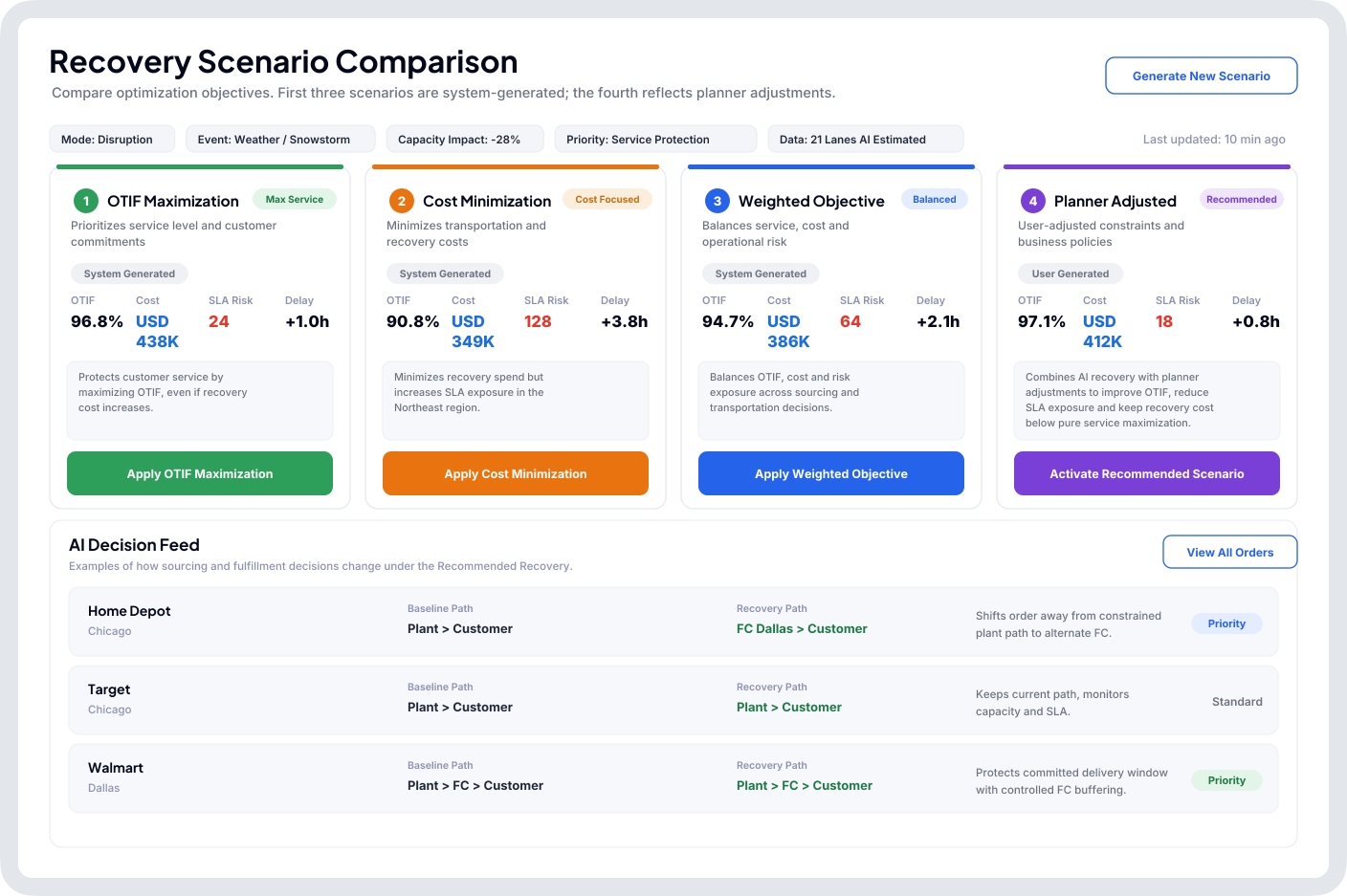
In Solvoyo’s demand planning, planners run what-if scenarios against the approved base plan in seconds: price changes, promotions, portfolio changes, competitor moves. They create, store, recall and compare scenarios side by side with the inventory, service and financial impact of each, and authorize the preferred scenario directly into the planning process, without rebuilding the forecast in a separate tool. In production planning, planners model a capacity change, such as an extra shift, overtime, a co-manufacturing partner or a plant closed for a season, and get a fully optimized production plan for that configuration in minutes, with cost and service shown together. Transportation and fulfillment scenarios can be tested against different objective functions.
An authorized scenario has already been solved with the same constraints as the live plan, so authorizing it needs no second round of edits: over 95% of Solvoyo’s plans execute untouched. To see a scenario run on your own data, request a demo.
Frequently Asked Questions
What-if analysis in supply chain planning changes one or more inputs of a plan, such as demand, lead times, capacity or costs, solves the plan again with the same constraints, and compares the result with the current base plan on cost, service and inventory before a decision is made.
The common types are demand scenarios (promotions, price changes, large orders), supply scenarios (supplier delays or shortages), capacity scenarios (shifts, overtime, line stoppages), cost scenarios (freight, fuel, tariffs) and short-term network scenarios (closing a DC for a week or rerouting flows). One disruption can combine several of these.
Operational and tactical what-if analysis keeps the network fixed and tests decisions for the coming days, weeks or months, so it has to run in seconds or minutes. Network design scenarios change the footprint itself, such as where DCs and plants sit, over a horizon of years, and are studied over weeks before a capital decision.